
Choosing a theme for a WooCommerce store is more complicated than picking a design from a demo library. Your theme has to work with WooCommerce, Elementor, product layouts, shopping pages, mobile screens, and the plugins that power your store. The right foundation can make customization easier, while the wrong one can create unnecessary styling conflicts and maintenance work. In 2026, Elementor-compatible WooCommerce themes should be evaluated for compatibility, performance, flexibility, responsive design, and ecommerce functionality, not appearance alone.
What Makes a Good Elementor WooCommerce Theme?
A good WooCommerce theme for Elementor should provide a stable foundation for both your store functionality and visual design.
Elementor can be used with WooCommerce, and Elementor Pro provides additional tools for designing and displaying WooCommerce products and store content.
However, the theme still matters. It can affect product grids, shop layouts, headers, navigation, typography, sidebars, and other parts of the storefront.
When evaluating an Elementor-compatible WooCommerce theme, look for:
- Reliable Elementor compatibility
- WooCommerce integration
- Responsive layouts
- Lightweight performance
- Flexible product and shop layouts
- Regular updates
- Plugin compatibility
- Useful customization controls
- Good documentation and support
The best choice depends on how much of the store you want Elementor to control and how much functionality you expect from the theme itself.
Need a hand with your store? See our Elementor WooCommerce services.
Best Elementor Compatible Themes for WooCommerce Stores
There is no single theme that is ideal for every ecommerce website. The following options take different approaches to WooCommerce and Elementor, from lightweight foundations to feature-packed premium themes, so your requirements should determine which one fits your project.
Hello Elementor
Hello Elementor is a minimal WordPress theme developed by Elementor. It is intentionally lightweight and provides a relatively clean foundation for websites built with Elementor. Elementor describes Hello as a theme designed to give creators flexibility and work closely with its visual builder.
For WooCommerce stores, this approach can be useful when you want Elementor to control most of the visual experience rather than relying on a feature-heavy theme.
Best suited for:
- Custom ecommerce designs
- Elementor-focused stores
- Developers who want greater design control
- Stores that need a minimal theme foundation
Its minimalist structure also means that you may need to build or configure more elements yourself.
Astra
Astra is a popular lightweight WordPress theme with dedicated WooCommerce functionality and Elementor integration. Astra provides Elementor-specific layouts and starter templates, while its WooCommerce integration includes additional controls for store elements.
This makes it useful for store owners who want a balance between Elementor customization and theme-level ecommerce controls.
Astra can be particularly practical when you want to start from a pre-built store layout and then customize it rather than creating every ecommerce component from scratch.
Best suited for:
- Small and medium-sized online stores
- Stores using Elementor and WooCommerce together
- Users who want starter templates
- Ecommerce websites requiring additional theme-level controls
OceanWP
OceanWP is another theme commonly used with Elementor and WooCommerce. It takes a more feature-rich approach than a minimal starter theme and can provide additional controls for ecommerce websites.
This type of theme can be useful when you want certain store functionality available at the theme level instead of creating everything through Elementor.
However, more features also mean you should evaluate which functionality you actually need. A store does not necessarily become better simply because its theme includes more options.
Best suited for:
- Feature-rich WooCommerce stores
- Users who want extensive customization
- Websites using Elementor alongside theme-level controls
Blocksy
Blocksy is a modern WordPress theme with strong WooCommerce customization capabilities. Its documentation shows detailed controls for individual product layouts, including the ability to arrange and style product elements.
For Elementor users, this type of theme can be useful when you want both a visual page builder and more control over the ecommerce foundation.
Best suited for:
- Modern ecommerce stores
- Product-focused websites
- Stores requiring detailed WooCommerce customization
- Users who want theme-level control alongside Elementor
Premium WooCommerce Themes That Work With Elementor
The themes above are lightweight foundations. If you would rather start with store features built into the theme, these ThemeForest favourites all support Elementor, but each takes a very different approach.
WoodMart
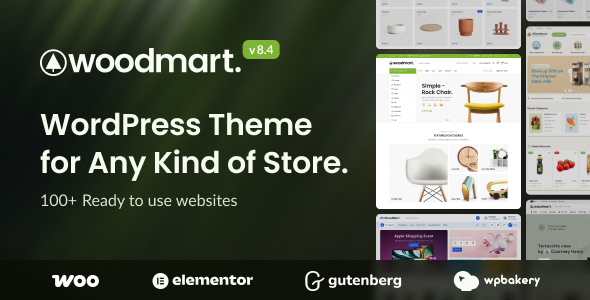
WoodMart by xtemos is one of the best-selling WooCommerce themes on ThemeForest and is updated very frequently. It works with Elementor, WPBakery and Gutenberg, and includes builders for the header, shop page, single product, cart, checkout and My Account pages.
Its biggest strength is the number of store features built in, including AJAX filters, swatches, frequently-bought-together bundles, dynamic discounts and waitlists. The trade-off is complexity: stores often duplicate those features with extra plugins. See our WoodMart customization services.
Best suited for:
- Large catalogs that need advanced filtering
- Stores that want sales features without extra plugins
- Fashion, furniture and electronics retailers
XStore
XStore by 8theme is built specifically for online stores and supports Elementor and WPBakery. Its Header Builder and Single Product Builder control two of the most important store templates, and its Sales Booster panel adds conversion features such as progress bars and urgency messages.
Wishlist, compare, quick view and AJAX filtering are built in, so the key to a fast XStore site is using its builders deliberately rather than stacking plugins on top. See our XStore customization services.
Best suited for:
- Stores that want a large choice of niche demos
- Owners who want custom product pages without code
- Conversion-focused stores
Porto
Porto by P-THEMES is one of ThemeForest’s longest-running WooCommerce themes. It works with Elementor, WPBakery and Gutenberg, and includes shop and single-product builders, a popup builder and Porto Studio for prebuilt blocks.
Its Speed Optimize Wizard handles critical CSS and asset merging, and it supports Dokan and WCFM for multivendor marketplaces. A recent release patched a security issue in the theme’s functionality plugin, a reminder to keep any feature-rich theme updated. See our Porto customization services.
Best suited for:
- Multivendor marketplaces
- Stores that want built-in speed tools
- Teams that may switch page builders later
Shopkeeper
Shopkeeper by Get Bowtied is a clean, visually led WooCommerce theme popular with fashion, furniture and lifestyle stores. One important note for 2026: according to the developer’s changelog, updates for the ThemeForest edition ended on 1 October 2026 with version 10.9.9, and newer releases are distributed through Get Bowtied’s own platform.
If you’re considering Shopkeeper, buy and update it through the developer’s platform. If you’re already on the ThemeForest edition, plan your next step. See our Shopkeeper customization and migration services.
Best suited for:
- Design-led stores with smaller catalogs
- Brands that want a minimal, image-first look
Elementor WooCommerce Themes: Quick Comparison
| Theme | Best For | Elementor Approach | WooCommerce Focus |
|---|---|---|---|
| Hello Elementor | Custom stores | Minimal, Elementor-focused | Strong foundation for custom layouts |
| Astra | Flexible ecommerce | Elementor + theme controls | Extensive WooCommerce integration |
| OceanWP | Feature-rich stores | Elementor + theme features | Strong ecommerce customization |
| Blocksy | Modern online stores | Flexible page-building setup | Detailed product and shop controls |
| WoodMart | Large catalogs | Elementor + WoodMart builders | Extensive built-in store features |
| XStore | Conversion-focused stores | Elementor + header and product builders | Sales Booster and store tools |
| Porto | Marketplaces and large stores | Elementor, WPBakery or Gutenberg | Shop builders and multivendor support |
| Shopkeeper | Design-led stores | Visual, image-first layouts | Updates now via the developer's platform |
The table is a starting point rather than a ranking. Your store’s requirements should determine which approach makes the most sense.
What Should You Consider Before Choosing a WooCommerce Theme for Elementor?
Elementor Compatibility
First, make sure the theme works properly with your Elementor setup.
Elementor states that it is compatible with most well-constructed WordPress themes, but some themes can introduce issues such as conflicts with certain theme features or preloaders.
If you use Elementor Pro, test the features you actually plan to use instead of relying only on the theme’s compatibility claim.
WooCommerce Integration
A theme should work correctly with the core shopping experience.
Check:
- Shop page
- Product archive
- Single product page
- Cart
- Checkout
- Customer account
- Product categories
- Product filters
- Related products
- Mobile shopping experience
A theme can look excellent on a homepage while providing a poor product or checkout experience.
Performance
Ecommerce websites already have multiple resources to load, including product images, payment integrations, analytics, marketing scripts, and WooCommerce functionality.
That makes theme efficiency important.
Avoid choosing a theme simply because it contains hundreds of built-in ecommerce features. If you do not need those features, they may add unnecessary complexity.
A lightweight theme can provide a cleaner starting point, but remember that actual store performance also depends on hosting, images, plugins, caching, fonts, and page structure.
Mobile Responsiveness
Mobile shopping should be tested before choosing a theme.
Check whether:
- Product grids adapt properly
- Images remain clear
- Navigation is easy to use
- Buttons are accessible
- Product variations are usable
- Cart and checkout remain readable
- Filters work properly
A theme that requires extensive mobile fixes may create unnecessary work later.
Customization
Consider which elements you want Elementor to control and which should remain theme-controlled.
For example, you may want Elementor to handle:
- Homepage
- Landing pages
- Promotional sections
- Custom product layouts
- Brand pages
At the same time, the theme may control:
- Basic WooCommerce structure
- Navigation
- Global typography
- Blog layouts
- Certain archive elements
Understanding this division can help prevent conflicts between the theme and Elementor.
Should You Use a Lightweight Theme for WooCommerce?
In many cases, a lightweight theme can be a sensible foundation for an Elementor WooCommerce store.
However, lightweight does not automatically mean better.
An ecommerce store can become slow because of large product images, excessive plugins, tracking scripts, poorly optimized fonts, or inefficient hosting even when the theme itself is lightweight.
The better approach is to consider the entire technical setup.
Choose a theme that provides the functionality you need while avoiding unnecessary features that duplicate what Elementor, WooCommerce, or your plugins already provide.
Hello Elementor vs Feature-Rich WooCommerce Themes
The biggest difference between Hello Elementor and a feature-rich ecommerce theme is the amount of functionality provided by the theme itself.
Hello is intentionally minimal. Elementor describes it as a lightweight foundation designed to provide flexibility, while its developer documentation shows dedicated WooCommerce and Elementor theme hooks.
A feature-rich theme, on the other hand, may provide additional shop layouts, product controls, headers, footers, filters, sidebars, and ecommerce settings.
Choose a minimal approach when you want Elementor to control most of the design.
Choose a more feature-rich approach when you want the theme itself to provide useful ecommerce functionality that would otherwise require additional customization.
Neither approach is automatically suitable for every store.
Common Mistakes When Choosing an Elementor WooCommerce Theme
Choosing Based Only on the Demo
A theme demo is designed to showcase its possibilities. Your store will contain different products, images, categories, plugins, and content.
Test the actual functionality you need.
Ignoring Product Pages
The product page is one of the most important parts of an ecommerce website. Check product images, variations, descriptions, reviews, related products, and add-to-cart functionality.
Installing Too Many Features
A theme with a long feature list may sound attractive, but unused functionality can make your setup harder to manage.
Forgetting Mobile Shopping
Do not evaluate the theme only on a desktop screen. Test the complete shopping journey on mobile.
Ignoring Updates
WordPress, WooCommerce, Elementor, and other plugins continue to evolve. An actively maintained theme is easier to manage over time.
Assuming Premium Means Better
Price does not guarantee compatibility or performance. A free theme may be enough for one store, while another project may require premium functionality.
How to Test a Theme Before Using It on a Live Store
If possible, test the theme on a staging website before committing to it.
Start by installing WooCommerce and Elementor, then create sample products and inspect the major store pages.
Test:
- Homepage
- Shop page
- Product category
- Single product
- Cart
- Checkout
- My Account
- Mobile layouts
- Navigation
- Elementor editing
Also check whether your essential plugins continue to work correctly.
This process can reveal theme conflicts before they affect customers.
Frequently Asked Questions
What are the best Elementor-compatible themes for WooCommerce?
Popular lightweight options include Hello Elementor, Astra, OceanWP and Blocksy. If you want more store features built in, premium themes such as WoodMart, XStore and Porto support Elementor. The right choice depends on your store’s requirements.
Is Hello Elementor good for WooCommerce?
Yes. Hello Elementor is a minimal theme designed to work closely with Elementor, and Elementor documents WooCommerce support for the theme.
Can I use Elementor with any WooCommerce theme?
Elementor works with most properly constructed WordPress themes, but individual themes can have compatibility limitations. Test the features and plugins required for your store before selecting a theme.
Do I need Elementor Pro for WooCommerce?
You can use Elementor with WooCommerce without necessarily needing Elementor Pro. Elementor states that both its free and Pro versions are compatible with WooCommerce, while Pro provides additional WooCommerce-focused design capabilities.
Is Astra good for an Elementor WooCommerce store?
Astra provides Elementor integration and dedicated WooCommerce functionality, making it a flexible option for stores that want both Elementor design controls and theme-level ecommerce features.
Is a lightweight theme better for WooCommerce?
A lightweight theme can provide a cleaner performance foundation, but overall store speed depends on many other factors, including hosting, product images, plugins, scripts, and caching.
Does the WooCommerce theme affect product page design?
Yes. The theme can influence product layouts, typography, spacing, sidebars, and other storefront elements. Elementor can provide additional control depending on your setup.
Can I change my WooCommerce theme after building my store?
Yes, but changing themes can affect layouts, styling, menus, widgets, templates, and WooCommerce elements. Always test a theme change on a staging site before applying it to a live store.
What should I prioritize when choosing an Elementor WooCommerce theme?
Focus on compatibility, WooCommerce functionality, performance, mobile responsiveness, customization, update frequency, and the actual requirements of your store.
Conclusion
The right Elementor-compatible WooCommerce theme should make your store easier to build, customize, use, and maintain.
A minimal option such as Hello Elementor can provide a clean foundation for highly customized Elementor stores, themes such as Astra, OceanWP and Blocksy add theme-level controls, and premium themes such as WoodMart, XStore and Porto bring extensive store features built in. If you use Shopkeeper, factor in the change to how its updates are distributed.
Instead of choosing a theme simply because its demo looks impressive, test the parts that directly affect your customers: product pages, shopping navigation, cart, checkout, mobile experience, and overall performance.
The best Elementor WooCommerce theme is ultimately the one that fits your store’s actual requirements without adding unnecessary complexity.
Need Help With Your WooCommerce Theme?
Whether you’re choosing a theme or fixing the one you have, we can help. We’ve delivered 800+ Elementor projects and customize dozens of popular WordPress themes. Send us your store for a free review. You can also browse every theme we customize, A to Z, or read our guide on how to choose a WordPress theme for Elementor.
Get a free quote · Request a free site audit · Chat on WhatsApp